Installation
Windows
You can download the latest release available, and simply unzip it in the folder where the program is ot be installed and launch P44D5.exe. The usage of a third party software to create a virtual MIDI output is still needed at the moment.
If you prefer to use the latest build available, install Python 3.X.X. Python download.
Launch a terminal in the folder where P44D5 is to be installed and enter the following commands.
git clone https://github.com/TSS-22/P44D5.git
cd P44D5
pip install -r requirements.txt
py ./P44D5.py
Windows and virtual MIDI ports
You will need to be able to create a virtual MIDI output port. At the moment it is easily doable only via the use of third party tools, but the new MIDI Windows API should change that soon.
At the moment we recommend using LoopMIDI for this. Once installed, open the program and create a virtual MIDI port called P44D5_virt. LoopMIDI will need to be running before you start P44D5 everytime.
For more information on how to setup these solutions, see boxes below.
Virtual port solution: LoopMIDI
To create the necessary virtual MIDI port using LoopMIDI, after you installed and launched it, you should be greated with the window below.
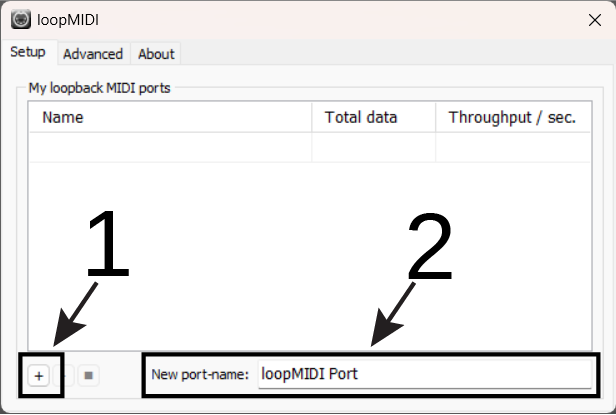
To create the virtual MIDI port necessary for the functionning of P44D5, write donw P44D5_virt in the New port-name field (2 in the screenshot above), then create it using the + button (1 in the screenshot above).
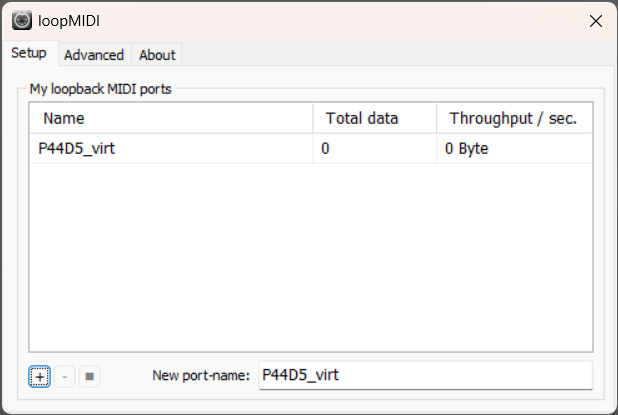
You should then have the newly created port listed just as in the screenshot below.
Linux
You can download the latest release available, and simply unzip it in the folder where the program is ot be installed and launch P44D5.bin.
If you prefer to use the latest build available, install Python 3.X.X. Python download.
Launch a terminal in the folder where P44D5 is to be installed and enter the following commands.
git clone https://github.com/TSS-22/P44D5.git
cd P44D5
pip install -r requirements.txt
py ./P44D5.py
MacOS (Untested)
P44D5 has not been tested on MacOS but should theoretically work without issues. If you encounter any problem, please file an issue to let us know.
Install Python 3.X.X. Python download.
Launch a terminal in the folder where P44D5 is to be installed and enter the following commands.
git clone https://github.com/TSS-22/P44D5.git
cd P44D5
pip install -r requirements.txt
py ./P44D5.py
!!! info "Linux/MacOS and virtual MIDI ports On Linux and MacOS the virtual MIDI port is created by P44D5 itself, so no third party tools are needed.